
How A Corner Computer Desk Is Built?
A corner Computer Desk is not just a variation of a straight desk. Its structure, load distribution, and daily usage patterns are different, especially when the desk supports monitors, accessories, and long working hours. At DAKSHOME, a corner computer desk is developed as a complete workstation solution, where proportions, materials, and construction are designed together to ensure long-term stability, comfort, and visual balance.
This article explains the key stages involved in building a corner computer desk, focusing on design logic, structural considerations, and finishing standards used in DAKSHOME products. For available models and configurations, visit: computer desk.
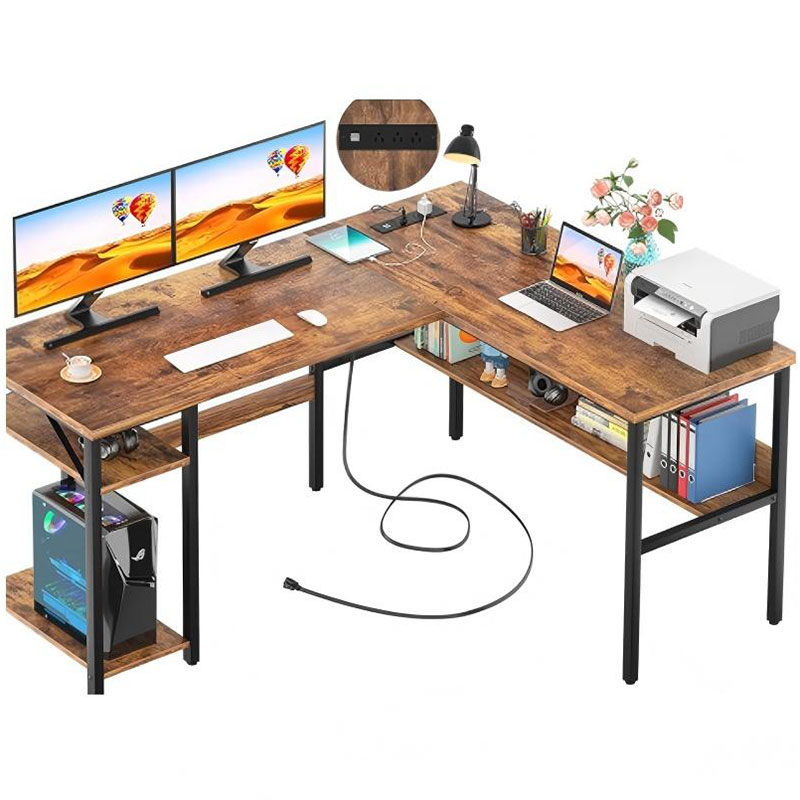
Table of Contents
I. Layout Definition
Every corner desk begins with defining the usable corner space rather than starting from a fixed size. The desk layout is planned to work within typical residential and office corners, allowing enough clearance for chair movement, legroom, and surrounding furniture. The two desk runs are proportioned so neither side feels secondary, which helps the desk function as a unified work surface rather than two disconnected Tables.
The corner area itself is designed to be functional, not decorative. Instead of a sharp internal angle that limits usability, the corner zone is shaped to support keyboard placement, monitor bases, or arm mounts. This ensures the center of activity remains comfortable during extended use.
II. Surface Proportioning
The desktop surface is sized based on real working behavior. Depth is balanced to support monitors and keyboards without pushing screens too far away, while length is controlled to avoid unsupported spans. For corner desks, surface proportioning also considers how weight concentrates near the joint where the two planes meet.
Attention is given to edge treatment and usable depth at the corner so that the desk does not feel cramped. The result is a surface that accommodates both focused computer work and auxiliary tasks such as writing or device charging.
III. Material Selection
Material choice directly affects durability and stability. Corner desks typically carry higher loads than straight desks, especially when dual monitors or desktop towers are involved. For this reason, desktop panels are selected with sufficient thickness and density to resist sagging over time.
Frame materials are chosen to complement the desktop, whether through metal structures that provide rigidity or reinforced wood components that distribute load evenly. Finishes are selected not only for appearance but also for resistance to daily wear, cleaning, and environmental changes.
IV. Frame Construction
The frame is engineered to resist lateral movement and twisting, which are common issues in large corner desks. Structural elements are arranged to support both desk runs evenly, with reinforcement near the corner junction to prevent flexing at the seam.
Leg placement is carefully planned so weight is transferred directly to the floor rather than relying on the desktop joint. Cross supports and rear rails are integrated where necessary to improve rigidity and to provide mounting points for accessories such as cable trays.
V. Corner Joint Reinforcement
The corner joint is the most critical structural area of a corner desk. Instead of treating it as a simple connection point, it is reinforced so the two desk surfaces behave as a single unit under load. This reduces movement when typing and prevents long-term loosening.
Reinforcement methods are designed to remain hidden beneath the desktop, preserving a clean appearance while maintaining structural integrity. Proper joint reinforcement is one of the main factors that differentiates a stable corner desk from one that feels unstable over time.
VI. Functional Integration
A modern corner computer desk must support cable management and accessory integration. Cable routing paths are planned during construction rather than added later, which keeps the workspace clean and avoids clutter near the user’s legs.
Space is also reserved for power strips, monitor arms, and storage accessories so the desk functions as a complete workstation. These integrations help maintain an organized surface and improve daily usability without compromising the desk’s structure.
VII. Assembly and Stability Control
Final assembly focuses on alignment and leveling. All structural connections are secured to maintain consistent contact between components, and the desk is leveled to compensate for uneven floors, which are common in corner locations.
Stability checks ensure the desk does not rock or sway under normal use. This stage is essential for achieving a solid feel, especially in corner configurations where movement is more noticeable.
VIII. Finishing and Quality Check
Surface finishing is completed to protect against moisture, abrasion, and frequent contact. Edges are refined for comfort, and finishes are inspected for consistency across the entire desk.
Before completion, the desk is evaluated for structural balance, surface usability, and overall proportions. This ensures the final product performs well as both a functional workstation and a cohesive piece of furniture.
Conclusion
Building a corner computer desk requires more than adapting a straight desk design. It involves careful layout planning, reinforced structure, balanced material selection, and integrated functionality. When these elements are addressed together, the result is a desk that feels stable, comfortable, and purpose-built for daily work.
DAKSHOME corner computer desks are developed with these principles in mind, offering designs that combine efficient use of space with long-term reliability. To explore available models and design options, visit: computer desk.