
Are Monitor Stands Worth It?
Monitor Stands are often seen as a simple desk accessory, but for many workstations they function more like a practical upgrade. A good stand changes how your screen sits relative to your eyes, how your keyboard and mouse area feels, and how efficiently you can use the space under and around your monitor. The value is not only about appearance. It comes down to whether the stand improves daily comfort, creates usable storage, supports your monitor safely, and keeps the setup sTable over time. This article explains when monitor stands are worth it, what benefits are realistic, what to watch out for, and how to choose the right option for different desks and working styles.
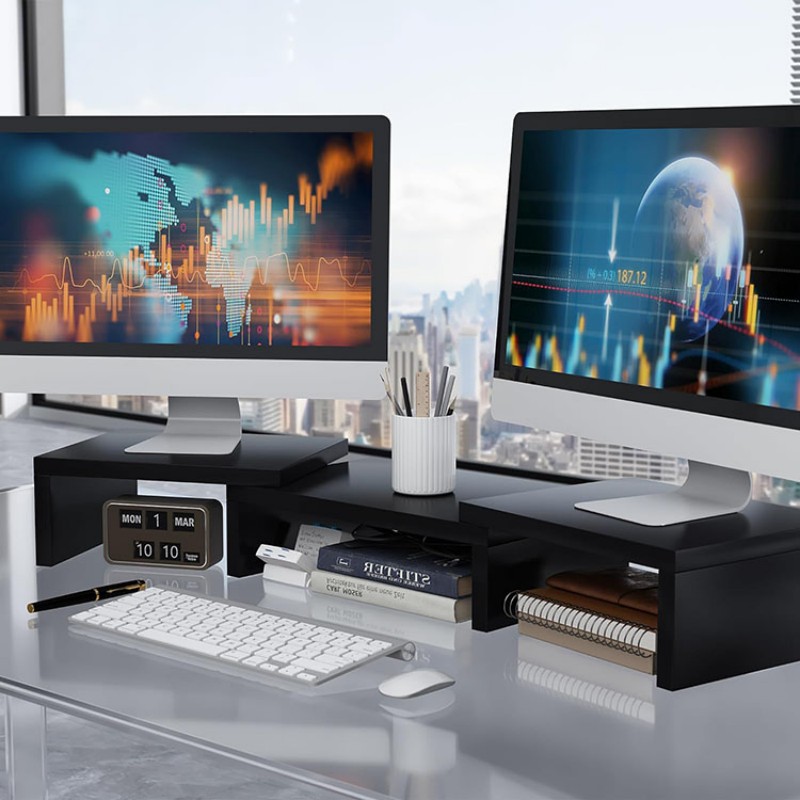
Table of Contents
- What A Monitor Stand Does In A Real Setup
- Ergonomic Value And Daily Comfort
- Desk Space Efficiency And Organization Benefits
- Productivity Gains In Multi-Task Workflows
- When A Monitor Stand Is Not Worth It
- Key Factors That Decide Whether It Is Worth It
- Monitor Stand Vs Monitor Arm
- A Practical Checklist For Choosing The Right Stand
- Common Use Cases Where Monitor Stands Deliver Strong Value
- Comparison Table: When Monitor Stands Are Worth It
- Why Many Buyers Choose DAKSHOME Monitor Stands
- Conclusion
What A Monitor Stand Does In A Real Setup
A monitor stand is a raised platform or support structure that lifts a monitor to a more ergonomic viewing height while creating additional space below the screen. In real use, the stand affects three things at once: screen height, desk organization, and load stability. When the height is right, the screen feels easier to view for long stretches. When the footprint is well-designed, you gain a convenient zone under the monitor for a keyboard, docking station, notebooks, or small office items. When the structure is strong and well-built, it reduces wobble and keeps the monitor secure, even when the desk is bumped or when you adjust cables.
Monitor stands are different from monitor arms. Arms are better for flexible positioning and multi-monitor movement, but they require clamping space and stronger desk edges, and they introduce more moving parts. Stands are usually simpler, faster to deploy, easier to standardize across multiple desks, and more predictable for offices that want a consistent look and stable layout.
Ergonomic Value And Daily Comfort
For most people, the best reason a monitor stand is worth it is ergonomic alignment. When a monitor is too low, you naturally tilt your head down and slightly forward. Over time, that posture can increase fatigue. A stand raises the monitor so the viewing angle feels more natural. Even a modest lift can make the work position feel more neutral, especially for laptops used with external monitors, or for desks where the monitor base sits low.
The real ergonomic advantage appears when the stand height and viewing distance are considered together. If you raise the screen without matching your chair height and keyboard position, you might fix one issue but create another. A well-chosen monitor stand supports a stable, repeatable setup where the monitor height is consistent, the keyboard area remains comfortable, and the eye line feels less strained. This is why many businesses standardize monitor stands across departments, because consistent height and layout reduces adjustment time for different users and helps keep workstations uniform.
Desk Space Efficiency And Organization Benefits
Monitor stands are also worth it when desk space is limited. The area under a monitor is often wasted because the monitor sits directly on the desktop. A stand turns that area into usable storage without expanding the desk footprint. This matters in compact home offices, shared offices, reception counters, call centers, training rooms, and project workstations where desks must stay tidy.
A stand can also reduce clutter by creating a defined place for items that otherwise spread across the work surface. For example, many people slide a keyboard under the stand when not typing, which immediately frees the front edge of the desk. Others store a laptop, tablet, paperwork tray, or small office tools under the screen. If your workflow involves quick switching between writing and typing, or frequent reference to printed documents, the improved organization can feel like a direct productivity boost.
Productivity Gains In Multi-Task Workflows
The productivity argument is not about the stand making you work faster by itself. It is about reducing friction. When the desk is organized and the screen sits at a comfortable height, you spend less time repositioning items, moving the keyboard around, or dealing with an unstable monitor base. In environments where staff rotate between desks, a stand also makes the station easier to reset because the screen height and storage zones are predefined.
For operations teams, the stand can also simplify cable routing. A stand with sufficient clearance and clean edges can help guide cables behind the monitor instead of letting them drape across the desk. This creates a more professional appearance in client-facing areas and reduces accidental cable pulls.
When A Monitor Stand Is Not Worth It
A monitor stand is not always the best choice. If you already have an adjustable monitor arm and your desk supports it well, adding a stand may be redundant. If your desk height and chair setup already place the monitor at a comfortable level, you may not feel a major difference. If your monitor is extremely large or heavy, a lightweight stand may not be suitable, and stability should come first.
Another case is when you require very frequent positional changes, such as switching between sitting and standing or rotating the monitor constantly for collaboration. In those setups, an arm can be better because it is designed for motion, while a stand is designed for stable placement.
Key Factors That Decide Whether It Is Worth It
A monitor stand becomes worth it when the selection matches real constraints. The most important decision points are monitor weight, required lift height, desk depth, and how you want to use the space under the screen. If you pick a stand that is too low, you will not gain ergonomic value. If the top platform is too small, it will not feel secure. If the clearance underneath is too tight, the extra space will not be usable. If the stand is not stable or the surface is slippery, the daily experience will feel worse, not better.
It also matters whether you need a single-unit upgrade for a home office or a standardized solution for multiple workstations. For project buyers, consistency, packaging, lead time, and repeatable quality matter as much as the stand itself.
Monitor Stand Vs Monitor Arm
A stand and an arm solve different problems. A stand is usually the better choice when you want stability, fast deployment, and a consistent workstation layout. An arm is usually better when you need flexibility, frequent repositioning, or multi-monitor alignment with precise adjustments. Many offices choose stands for standard desks and arms only for specialized roles such as design, trading desks, or multi-screen operations.
The simplest way to decide is to look at whether movement is your main need. If you want the monitor to stay put at a better height and you want extra storage under it, a stand is often the cleaner answer. If you constantly move the monitor, rotate it, or shift it forward and backward, an arm may be more appropriate.
A Practical Checklist For Choosing The Right Stand
Confirm your monitor size and weight and leave a safety margin so the stand is not operating at its limit.
Decide the lift you actually need by checking current screen height relative to your seated posture.
Measure desk depth so the stand does not push the monitor too close to your eyes.
Consider what you want to store under the stand, such as a keyboard, docking station, laptop, or document tray.
Look for stable construction, a non-slip surface, and edges that will not damage cables or hands.
Consider cleaning, durability, and surface finish if the desk is in a public or high-use area.
If you manage multiple sites or departments, prioritize consistency, packaging standards, and scalable supply.
Common Use Cases Where Monitor Stands Deliver Strong Value
Monitor stands tend to be most worth it in setups where desks are small, where the monitor is consistently too low, or where a tidy surface is required. Home offices benefit because space is limited and ergonomics are often overlooked. Corporate offices benefit because uniform workstations improve usability and appearance. Front desks and reception areas benefit because clean cable management and organized surfaces look more professional. Training rooms and shared workspaces benefit because the setup is repeatable and easy to reset after each session.
In many procurement scenarios, a monitor stand becomes part of a broader workstation solution, especially when a business wants consistent desktop organization across multiple rooms. In these cases, stands are often chosen not only for comfort but also for visual consistency and easier maintenance.
Comparison Table: When Monitor Stands Are Worth It
| Situation | A Stand Is Usually Worth It | An Arm May Be Better |
|---|---|---|
| Monitor feels too low on the desk | Yes, if you need a stable height lift | Also works, but may be unnecessary |
| Desk space feels crowded | Yes, because you gain storage under the screen | Sometimes, but arm does not create under-screen storage |
| You reposition the monitor frequently | Not ideal if movement is constant | Better for frequent adjustments |
| Desk edge is thin or not suitable for clamps | Yes, stands do not require clamping | Arm may not be safe or stable |
| Standardizing 20+ workstations | Yes, stands are easy to deploy consistently | Arms require more installation and tuning |
| Very large, heavy monitors | Only with properly rated, stable stands | Arms can work but must be heavy-duty |
Why Many Buyers Choose DAKSHOME Monitor Stands
DAKSHOME focuses on monitor stands designed for real workstation needs, including stable support, practical storage clearance, and a clean professional look that suits both office and home environments. For organizations that need a repeatable solution, DAKSHOME supports OEM/ODM options so you can align size, structure, surface details, and packaging with your project requirements. This helps project teams maintain consistency across different locations and supports bulk order planning with predictable specifications.
If your goal is not only to lift the monitor but also to build a more organized desktop, choosing a supplier that can deliver consistent quality and configurable options reduces procurement risk and simplifies rollout.
Conclusion
Monitor stands are worth it when they solve a real problem: a screen that sits too low, a desk that feels cramped, or a workstation that needs to look tidy and consistent. The best stands improve daily comfort by raising the monitor to a better viewing height, improve organization by creating usable space under the screen, and improve stability compared to makeshift solutions like stacked books. They are less worth it when you already have a strong monitor arm setup or when you need constant repositioning.
If you are evaluating a monitor stand for a workstation upgrade or a larger project rollout, you can browse DAKSHOME monitor stand options on our site and compare sizes and structures based on your desk layout. If you have questions about fit, load support, packaging, or customization direction, you can contact us for guidance. We can support OEM/ODM development and bulk order coordination to match your workstation plan and specifications.
Previous: How Wide Is A File Cabinet?