
How Big Should A Computer Desk Be?
A Computer Desk should be big enough to support your screen setup, keep your working posture comforTable, and leave practical space for the items you actually use every day. The right size is not the same for everyone because the ideal dimensions depend on monitor count, laptop versus desktop use, keyboard and mouse space, and whether you need room for writing, storage, or peripherals. A desk that is too small forces clutter and awkward posture. A desk that is too large can overwhelm a room and reduce circulation space, especially in apartments or multi-use bedrooms.
This guide explains how to size a computer desk based on real work habits and room constraints, including recommended widths, depths, and heights, plus spacing for chair movement and accessories. To compare desk configurations and footprints, you can explore DAKSHOME’s computer desk collection.
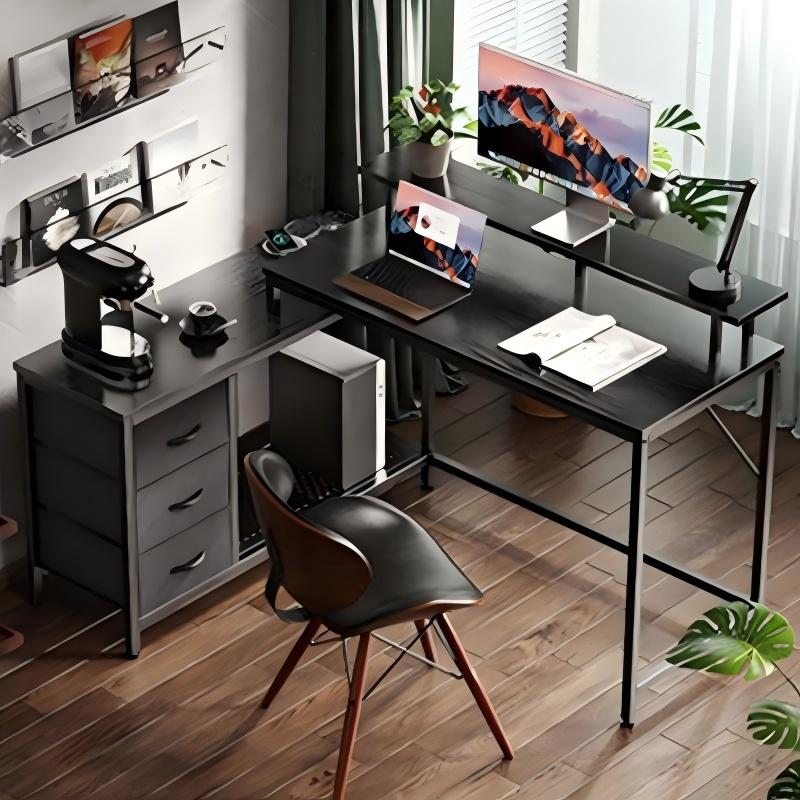
Table of Contents
- Start With The Three Core Desk Dimensions
- Recommended Desk Width By Setup Type
- Desk Depth Determines Screen Comfort And Posture
- Desk Height And Ergonomic Fit
- Space For Keyboard, Mouse, And Writing
- Room Planning And Clearance Around The Desk
- Storage Needs Change The Best Desk Size
- When A Custom Desk Size Is The Right Choice
- Quick Sizing Summary Table
- Conclusion
Start With The Three Core Desk Dimensions
A desk’s usefulness is mostly determined by width, depth, and height. These three numbers influence comfort more than the desk style name.
Width determines how much horizontal working space you have for monitors, a laptop stand, speakers, and writing.
Depth determines how far your screen sits from your eyes and whether you can keep your keyboard and mouse in a natural position without your wrists hanging off the edge.
Height determines whether your elbows and shoulders stay neutral during long sessions.
The best approach is to define your setup first, then choose desk dimensions that support it without forcing compromises.
Recommended Desk Width By Setup Type
Width is usually the first dimension people underestimate. A single laptop can sit on a small surface, but comfort drops quickly once you add an external monitor, a keyboard, and a mouse area you can actually use.
A practical reference range looks like this:
| Setup Type | Recommended Desk Width | Why This Range Works |
|---|---|---|
| Laptop only, light tasks | 39–47 in | Enough for laptop plus basic mouse space |
| Laptop plus 1 monitor | 47–55 in | Allows monitor centered, laptop side, and writing zone |
| 1 large monitor or ultrawide | 55–63 in | Creates balanced left-right space and cable room |
| Dual monitors | 63–71 in | Supports two screens plus keyboard and peripherals |
| Dual monitors plus printer or gear | 71–79 in | Prevents equipment from crowding elbow space |
If you tend to spread papers, use a drawing tablet, or keep a docking station and accessories visible, sizing toward the upper end of each range reduces daily clutter.
Desk Depth Determines Screen Comfort And Posture
Depth matters because it sets your viewing distance. A shallow desk often forces the monitor too close, making you lean back or crane your neck. It also reduces the space where your forearms can rest naturally while typing.
For most computer desk use, these depth ranges are common:
19–23 in depth works for laptop-only or wall-mounted monitor setups, but it can feel tight with a standalone monitor and full-size keyboard.
23–27 in depth is a practical range for most single-monitor work, giving space for monitor stand and comfortable keyboard placement.
27–31 in depth is ideal for larger monitors, dual monitors, or users who want a dedicated writing zone in front of the keyboard.
A deeper desk can also help cable management because power strips and cable trays sit behind the main work zone instead of competing for surface space.
Desk Height And Ergonomic Fit
Most desks are built around a standard height, but user comfort depends on chair height and body size. If the desk is too high, shoulders lift and wrists bend upward. If it is too low, you hunch forward.
A common fixed desk height is around 28–30 inches. That range works for many users when paired with an adjustable chair. If you are selecting a desk for shared use, adjustable chairs often solve most height differences without requiring a height-adjustable desk.
What matters is the working posture: elbows should sit near a right angle, wrists should stay neutral, and the screen should be positioned so the top of the display is near eye level.
Space For Keyboard, Mouse, And Writing
A computer desk is not just a monitor stand. A good desk size includes enough surface for the keyboard and mouse to operate naturally, plus a small zone for notes, a phone, or a document.
For many users, the keyboard and mouse zone requires more space than expected. If the desk is narrow, the mouse area gets constrained and posture becomes twisted. That is why a desk that looks fine for a laptop may feel uncomfortable once you switch to a full-size keyboard and mouse.
If your job requires frequent writing, you also need a clear area that does not force you to shift the keyboard constantly. A desk with enough width and depth can maintain a stable layout where tools stay where you expect them.
Room Planning And Clearance Around The Desk
Desk size must fit the room. Even a well-sized desk becomes impractical if the chair cannot move freely or if the desk blocks drawers, doors, or closet openings.
Plan for:
Sufficient clearance behind the chair for sitting down and standing up
Room for the chair to roll without hitting a Bed Frame, wall, or shelf
Side clearance so you can access drawers or storage without twisting
In compact rooms, choosing a desk with efficient depth and built-in organization can preserve circulation space while still supporting a comfortable setup.
Storage Needs Change The Best Desk Size
Some desks rely on open space and minimal structure. Others include drawers, shelves, or side cabinets. Storage adds value, but it can change usable leg space and reduce the open area where you can sit centered.
If you need storage, consider where your legs will go and whether the storage layout forces you to sit off-center. For long work sessions, centered seating is important for shoulder and neck comfort.
A practical approach is to decide whether storage should be under the desktop, beside it, or above it. This helps you avoid choosing a desk that looks organized but feels cramped in daily use.
When A Custom Desk Size Is The Right Choice
Standard desk sizes cover most needs, but a custom size is useful when the room or use case is specific. Examples include fitting a desk into a niche wall, aligning with built-in shelving, or creating a desk that matches an existing furniture grid.
A custom solution can also be valuable for project buyers outfitting multiple rooms with consistent layouts. Standardizing on a durable desk footprint simplifies installation and makes future replacement easier.
To explore common sizes and layouts, visit DAKSHOME’s computer desk range and compare footprints against your room plan and equipment list.
Quick Sizing Summary Table
| Priority | Best Desk Size Direction | Practical Reason |
|---|---|---|
| Small room, laptop use | Moderate width, moderate depth | Keeps circulation space while supporting essentials |
| Single monitor daily work | Mid-to-wide width, mid depth | Reduces clutter and improves typing comfort |
| Dual monitors or gaming | Wide width, deeper top | Improves screen distance and peripheral spacing |
| Writing and computer mix | Wider and deeper | Maintains a stable writing zone without rearranging |
This summary helps you pick a size direction before you decide on style.
Conclusion
A computer desk should be sized around how you work, not just how it looks in a product photo. Width determines whether your setup feels crowded, depth controls screen distance and posture, and height influences long-session comfort. For most users, choosing a desk that supports the monitor layout, allows a full keyboard and mouse zone, and fits the room with proper chair clearance delivers the best day-to-day experience.
If you are planning a home office upgrade or sourcing desks for a project, contact DAKSHOME with your room dimensions, monitor setup, and storage expectations. We can recommend practical desk sizes and durable configurations from our range and provide guidance to help you choose a layout that fits both your space and your workflow.
Previous: What Is The Wardrobe?